Example: a verified-only community
Let's set up Lumen Art Club, an art community of 4,000 members that gets hit by raids now and then. The goals:
- a newcomer sees only the verification channel until they solve a captcha;
- accounts less than 7 days old don't get in at all;
- verified members are welcomed, and the welcome channel isn't flooded with raid accounts;
- the newcomer knows what to do the moment they join.
Every command below can be copied as-is. Allow about ten minutes.
1. Roles and channels
Create two roles:
- @Pending: no permission at all. It only opens the verification channel.
- @Member: opens the rest of the server.
Then, in Discord's channel settings:
| Channel | @everyone | @Pending | @Member |
|---|---|---|---|
#verify |
Can't see | View, send messages, read history | Can't see |
#welcome |
Can't see | Can't see | View, read history (no sending) |
| Every other category | Can't see | Can't see | View, as you like |
Finally, drag iHorizon's role above @Pending and @Member, and check that iHorizon has Manage Roles, Kick Members, Ban Members and Manage Server, and that it can send messages, attach files and manage messages in #verify.
2. The Pending role on arrival
Open the welcomer panel:
Section Join Role: pick @Pending. Once the captcha is set up (next step), everyone who joins gets it at once, with their captcha, and sees #verify and nothing else.
Why @Pending comes at once
With the captcha on, the join roles wait for the right code. @Pending is the exception because it's also the captcha's role to remove: iHorizon gives it right away, since it's what opens #verify, and doesn't give it back after the captcha. Any other join role (a @Newcomer badge, say) would come only after verification.
3. The captcha
/security channel id:#verify
/security role-to-give role:@Member
/security role-to-remove role:@Pending
/security config action:Power On
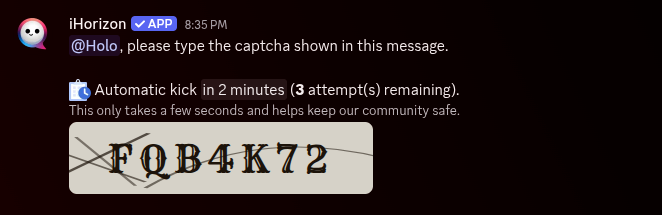
A newcomer now gets a 7-character code in #verify, mentioning them. The right answer gives @Member and removes @Pending: #verify disappears and the server opens. Three wrong answers, or 2 minutes 30 seconds of silence, and they're kicked.
4. Keep out accounts younger than 7 days
An account younger than 7 days is kicked on its first two tries and banned on the third. It doesn't wait for the captcha: the kick lands within a second, while the captcha it was also given simply expires.
5. The welcome
With the captcha on, the welcome waits for it: the welcome message, the join DM and the ghost pings go out the moment the right code is typed, and never for an account that fails, runs out of time or is kicked as too new. There's nothing to switch on.
- In the welcomer panel, section Channels, set #welcome as the Join Channel. Only verified members are announced there, and the newcomer, who just got @Member, sees their own welcome arrive.
-
Section Join Message, Set message:
-
A Leave Channel is safe too: the accounts the captcha and the age check turn away get no goodbye, only members who were welcomed do.
The DM now reaches verified members, so use it to point them to what's next. Section Join DM, Set Message:
Welcome to {guildName}, {memberMention}! You're verified: have a look at #rules and pick your roles in #roles.
The captcha message itself tells the newcomer what to do in #verify. A ghost ping in #rules works too: it's sent after the captcha, once @Member lets them see the channel.
6. Returning members: the role saver?
The role saver gives a returning member their roles back once they've solved the captcha, like the join roles. A former member starts from @Pending like everyone else, and gets @Member and their art roles back the moment they type the right code; @Pending, which the captcha removes, isn't given back. Turn it on, without giving back administrator roles:
A former member who fails the captcha gets nothing back, and their note is kept for their next try.
7. Test it
Ask a friend with an account older than a week (or use an alt) to join:
- They see only
#verify, and the captcha mentioning them. No DM and no welcome yet. - They type the code:
#verifydisappears, the server opens, their welcome is posted in#welcome, and the DM arrives. - A second try with a wrong code three times: they're kicked with the reason Security process failed.
What you get
| Situation | What happens |
|---|---|
| A real newcomer joins | @Pending at once and a captcha in #verify; nothing else yet |
| They solve the captcha | @Member given, @Pending removed: the server opens; then the welcome in #welcome, the DM and the ghost ping in #rules |
| They don't answer within 2 min 30 s | Kicked; no welcome, no DM, no goodbye |
| A 2-day-old account joins | Kicked within a second (banned on its third try); no welcome, no goodbye |
| Thirty raid accounts join at once | All kicked or stuck on a captcha they can't read; #welcome stays quiet |
| A former member comes back (role saver off) | Starts again from @Pending, like a newcomer |
| A former member comes back (role saver on) | Starts from @Pending, and gets their old roles back the moment they solve the captcha |
| Someone you blacklisted comes back | Banned on arrival, without a welcome |
| iHorizon loses Manage Roles | Nobody gets @Pending, so newcomers can't see #verify and are kicked after 2 min 30 s: give it back quickly |