Profile
This category covers two kinds of personalization. The /custom commands change how iHorizon itself looks on your server, its name, avatar, banner, and bio, so the bot can match your community's branding. The /profil commands build your own profile card inside iHorizon, where you can share a few things about yourself with the rest of the server.
/custom name <action> [name]
Requires the Administrator permission
Only members with the Administrator permission can use this command.
| Option | Type | Required | Choices |
|---|---|---|---|
action |
String | Yes | Bot Name, Set one |
name |
String | No | - |
Changes the nickname iHorizon uses on your server. Choose Set one and fill in name to give the bot a custom name, or Bot Name to reset it back to the default.
/custom avatar <action> [avatar]
Requires the Administrator permission
Only members with the Administrator permission can use this command.
| Option | Type | Required | Choices |
|---|---|---|---|
action |
String | Yes | Bot Avatar, Set one |
avatar |
Attachment | No | - |
Changes iHorizon's avatar on your server. Upload an image with Set one, or pick Bot Avatar to restore the default.
/custom banner <action> [banner]
Requires the Administrator permission
Only members with the Administrator permission can use this command.
| Option | Type | Required | Choices |
|---|---|---|---|
action |
String | Yes | Default Bot Banner, Set one |
banner |
Attachment | No | - |
Changes the banner shown on iHorizon's profile. Upload your own with Set one, or choose Default Bot Banner to go back to the standard one.
/custom bio <action> [bio]
Requires the Administrator permission
Only members with the Administrator permission can use this command.
| Option | Type | Required | Choices |
|---|---|---|---|
action |
String | Yes | Default Bot Description, Set one |
bio |
String | No | - |
Changes the "about me" text on iHorizon's profile. Write your own with Set one, or reset it with Default Bot Description.
/profil show [user]
| Option | Type | Required | Choices |
|---|---|---|---|
user |
User | No | - |
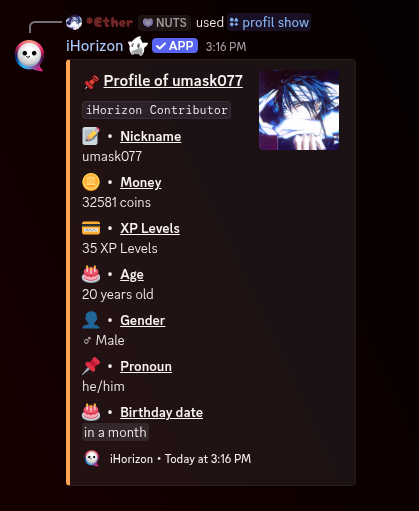
Displays a member's iHorizon profile card, with the details they have filled in. Leave user empty to see your own, or pick someone to view theirs.
/profil set-age <age>
| Option | Type | Required | Choices |
|---|---|---|---|
age |
Number | Yes | - |
Sets the age shown on your profile.
/profil set-description <description>
| Option | Type | Required | Choices |
|---|---|---|---|
description |
String | Yes | - |
Sets a short description, or "about me", on your profile. This is your space to say who you are.
/profil set-gender <gender>
| Option | Type | Required | Choices |
|---|---|---|---|
gender |
String | Yes | ♀ Female, ♂ Male, ⚧ Non-binary |
Sets the gender shown on your profile.
/profil set-pronoun <pronoun>
| Option | Type | Required | Choices |
|---|---|---|---|
pronoun |
String | Yes | she/her, he/him, they/them, xe/xem, ze/zem, other (say my name) |
Sets the pronouns shown on your profile, so other members know how to refer to you.
/profil set-birthday
Sets your birthday on your profile. iHorizon asks you for the date, then displays it on your card.