Backups
iHorizon allows you to backup your Discord servers: all server configurations, server roles and permissions, text and voice channels and their permissions, emojis, as well as bans will be saved by the iHorizon bot with a unique identifier (similar to a Discord user ID) for each backup. iHorizon also saves the server icon, banner and splash images, the AFK channel and timeout, widget settings, and the member list (nicknames and roles). Keep in mind that this identifier can only be used by the person who created the backup.
Who can use the backup system
Until /backup manage has been run once, only the server owner can create or load backups; administrators are refused. Run /backup manage to open it up to all administrators.
iHorizon provides several commands to manage your server backups. For more information on backup commands, please consult our command search engine at: 🔗 https://search.ihorizon.org
/backup create <save-message>
Requires the Administrator permission
Only members with the Administrator permission can use this command.
| Option | Type | Required | Choices |
|---|---|---|---|
save-message |
String | Yes | Yes, No |
This command allows you to create backups of the server where the command is executed. This command depends on /backup manage to know who has permission to perform server backups; as long as it has never been run, only the server owner can create a backup. Additionally, there is a save-message option to backup sent messages: choosing Yes saves up to 100 messages per channel. After executing the command, the bot will provide a unique identifier that can be used. This identifier contains everything iHorizon can backup (server configuration, roles, permissions, text and voice channels, etc.) at the time the command is executed.
Perform backups periodically!
Since iHorizon does not provide the option to schedule periodic server backups, and if you make daily changes to your server (adding channels, removing roles, changing server configuration, etc.), we recommend setting a reminder on your calendar or using the iHorizon reminders module.
/backup list
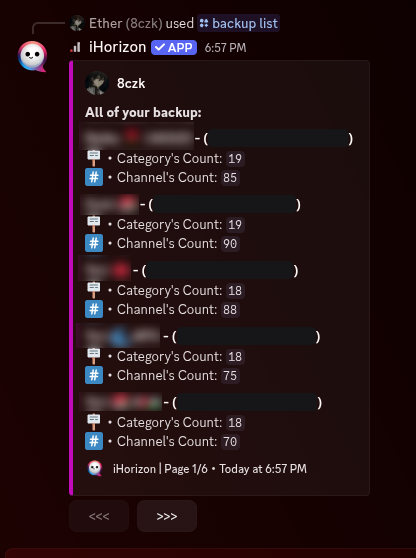
This command allows you to list all backups of all servers created by you. You can see the server name and the number of saved categories and channels. Results are paginated 5 per page, with navigation buttons that stay active for one minute.
/backup load <backup-id>
Requires the Administrator permission
Only members with the Administrator permission can use this command.
| Option | Type | Required | Choices |
|---|---|---|---|
backup-id |
String | Yes | - |
This command allows you to load a backup onto a server, and the bot will send you a configuration message.
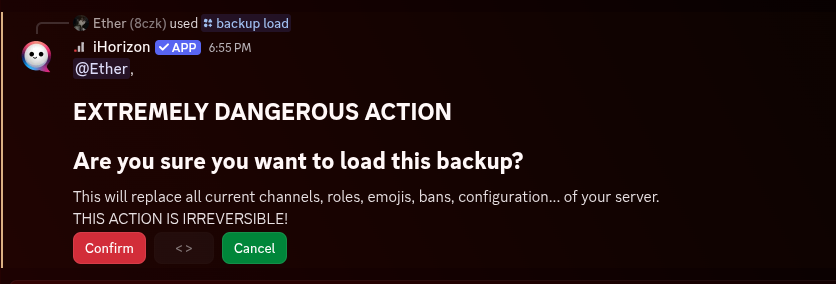
Clicking "Confirm" will start the backup loading process, while canceling will not start the process.
Loading a backup erases the server first!
Loading does not merge anything: before restoring, iHorizon deletes every role, every channel, every emoji and every webhook on the server, and unbans all banned members. Only then is the backup restored.
Once you click "Confirm", there is no way to undo the action! We therefore recommend creating a backup (with /backup create) which will give you a different identifier for the current server configuration.
Before using the /backup load command...
To load a backup onto your server using the /backup load command, you must first execute the /backup manage command with the option that suits you. Until then, only the server owner can load a backup. This is a security measure to prevent malicious users from performing server "raids" using our backup system.
You can only load a backup that you created; someone else's identifier will be refused. The backup does not have to come from this server, which is what makes it possible to clone a server you backed up elsewhere.
iHorizon needs the Administrator permission
The bot itself must have the Administrator permission on the server to restore a backup, otherwise the command stops with an error.
/backup delete <backup-id>
| Option | Type | Required | Choices |
|---|---|---|---|
backup-id |
String | Yes | - |
Deletes a server backup from iHorizon's database. Specify the backup identifier and iHorizon shows you the backup it is about to remove, with a confirmation button: nothing is deleted until you confirm, and the prompt expires after 15 seconds. You can only delete backups you created yourself.
/backup manage <only_guild_owner>
Server owner only
Only the server owner can use this command.
| Option | Type | Required | Choices |
|---|---|---|---|
only_guild_owner |
String | Yes | Only owner, All admin(s) |
This command configures the server backup system to determine who can perform server backups. Two options are available: Only Owner and All Admin(s). The first option allows only the server owner (not all admins) to perform backups, while the second option allows the owner and server administrators to perform backups.