Security
The Security module protects your server with a captcha. When a new member joins, iHorizon sends them an image containing a code that they have to type back to prove they are human. Automated raid accounts and self-bots can't read the image, so they never get past it. Once a member solves the captcha, iHorizon can hand them an access role and strip away a "pending" role, opening up the rest of the server only to verified people.
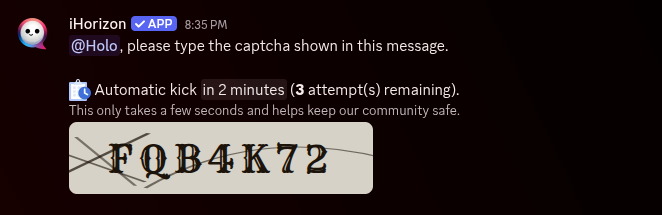
Set up the four commands below in any order, then power the module on with /security config.
/security channel <id>
Requires the Administrator permission
Only members with the Administrator permission can use this command.
| Option | Type | Required | Choices |
|---|---|---|---|
id |
Channel | Yes | - |
Sets the channel where new members receive and solve their captcha. This is the one place a brand-new, unverified member should be able to see, so give it permissions accordingly.
/security config <action>
Requires the Administrator permission
Only members with the Administrator permission can use this command.
| Option | Type | Required | Choices |
|---|---|---|---|
action |
String | Yes | Power On, Power Off |
Turns the captcha verification on or off. Configure the channel and roles first, then power it on so every new arrival is asked to verify.
/security role-to-give <role>
Requires the Administrator permission
Only members with the Administrator permission can use this command.
| Option | Type | Required | Choices |
|---|---|---|---|
role |
Role | Yes | - |
Chooses the role a member receives once they solve the captcha. This is usually your "Verified" or "Member" role that unlocks access to the rest of the server.
/security role-to-remove <role>
Requires the Administrator permission
Only members with the Administrator permission can use this command.
| Option | Type | Required | Choices |
|---|---|---|---|
role |
Role | Yes | - |
Chooses a role that is taken away once a member passes the captcha. This pairs with a "Unverified" or "Pending" role assigned on join, so verified members lose their restricted status. It is optional; leave it unset if you only want to add a role.