Rankings
The Rankings module rewards activity with experience points. Every time a member sends a message, iHorizon gives them a little XP, and as that XP piles up they climb through levels. Use it to recognize your most active members, run a leaderboard, and unlock roles as people level up. The commands below let you switch the system on, tune how it announces level-ups, and manage everyone's progress.
/ranks roles
Requires the Administrator permission
Only members with the Administrator permission can use this command.
Sets up level rewards: roles that iHorizon automatically hands out when a member reaches a given level. Use it to grant, say, a "Regular" role at level 10 or a "Veteran" role at level 50, giving people something concrete to aim for.
/ranks config <action>
Requires the Administrator permission
Only members with the Administrator permission can use this command.
| Option | Type | Required | Choices |
|---|---|---|---|
action |
String | Yes | Power On the module (send message when user earn xp level), Power Off the module (don't send any message but user still earn xp level), Disable the module (don't send any message and user don't earn xp level) |
Controls the module's overall state, with three levels of quiet:
- Power On: members earn XP and iHorizon announces every level-up.
- Power Off: members still earn XP, but iHorizon stays silent about level-ups.
- Disable: no XP is earned and no messages are sent; the system is fully paused.
/ranks show [user]
| Option | Type | Required | Choices |
|---|---|---|---|
user |
User | No | - |
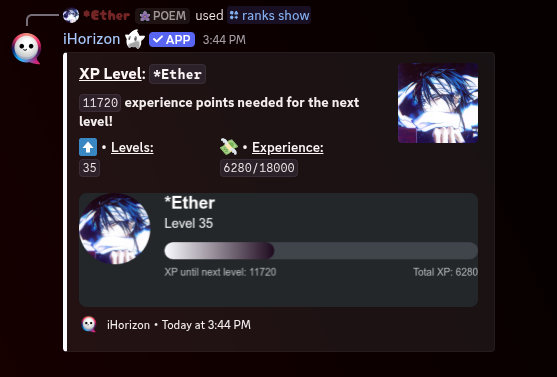
Shows a member's rank card with their level, XP, and position on the server. Leave user empty to see your own, or pick someone to check theirs.
/ranks ureset <user>
Requires the Administrator permission
Only members with the Administrator permission can use this command.
| Option | Type | Required | Choices |
|---|---|---|---|
user |
User | Yes | - |
Resets a single member's XP and level back to zero, without touching anyone else. Useful for correcting an unfair boost or starting a member fresh.
/ranks greset
Requires the Administrator permission
Only members with the Administrator permission can use this command.
Resets the XP and levels of everyone on the server at once. This wipes all progress and cannot be undone, so keep it for a clean slate, like the start of a new season.
/ranks channel <action> [channel]
Requires the Administrator permission
Only members with the Administrator permission can use this command.
| Option | Type | Required | Choices |
|---|---|---|---|
action |
String | Yes | Remove the module (send xp message on the user's message channel), Power on the module (send xp message on a specific channel) |
channel |
Channel | No | - |
Decides where level-up announcements appear. Choose to send them straight to a dedicated channel (so they don't clutter conversations), or switch back to announcing in whichever channel the member was chatting in.
/ranks leaderboard
Displays the server's XP leaderboard, ranking members from the highest level down. It is the scoreboard that turns activity into a bit of friendly competition.
/ranks ignore-channels
Requires the Administrator permission
Only members with the Administrator permission can use this command.
Lets you mark channels where messages don't earn XP. Point it at bot-command channels, spam channels, or off-topic corners so people can't farm levels there.
/ranks message
Requires the Administrator permission
Only members with the Administrator permission can use this command.
Customizes the message iHorizon sends when a member levels up. Write your own text with placeholders for the member and their new level, so the announcement fits your server's tone.