MemberCount Module
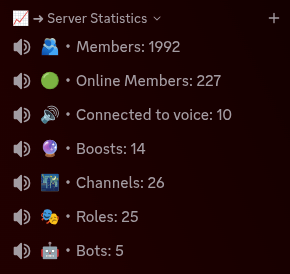
The MemberCount module turns a voice channel into a live counter. Instead of a normal name, the channel displays a server statistic that iHorizon keeps up to date on its own, so anyone glancing at your channel list sees the number right away. It is commonly used to show off your member count, but it can track several other statistics too.
/membercount <action> <channel> [name]
Requires the Administrator permission
Only members with the Administrator permission can use this command.
| Option | Type | Required | Choices |
|---|---|---|---|
action |
String | Yes | Power on, Power off |
channel |
Channel | Yes | - |
name |
String | No | - |
This command sets up (or removes) a counter channel. Choose Power on and select the voice channel you want to use, then give it a name containing one of the placeholders below. iHorizon replaces the placeholder with the real value and refreshes the channel name automatically as the number changes. Choosing Power off on a channel stops it from updating.
The name option accepts these placeholders, which you can mix with your own text (for example 👥 Members: {MemberCount}):
| Placeholder | Shows |
|---|---|
{MemberCount} |
Total members on the server |
{OnlineCount} |
Members currently online |
{BotCount} |
Number of bots |
{RolesCount} |
Number of roles |
{ChannelCount} |
Number of channels |
{VoiceCount} |
Members connected to voice |
{BoostCount} |
Number of server boosts |