VoiceDashboard
VoiceDashboard is iHorizon's "Join-To-Create" system for voice channels. You set up a single hub channel; the moment a member joins it, iHorizon spins up a fresh voice channel of their own and hands them a control panel to run it. They can rename it, set a user limit, lock it, kick people, and more, all from an interface, and the channel disappears on its own once everyone leaves. Instead of a wall of empty static voice channels, your server creates exactly as many as it needs, when it needs them.
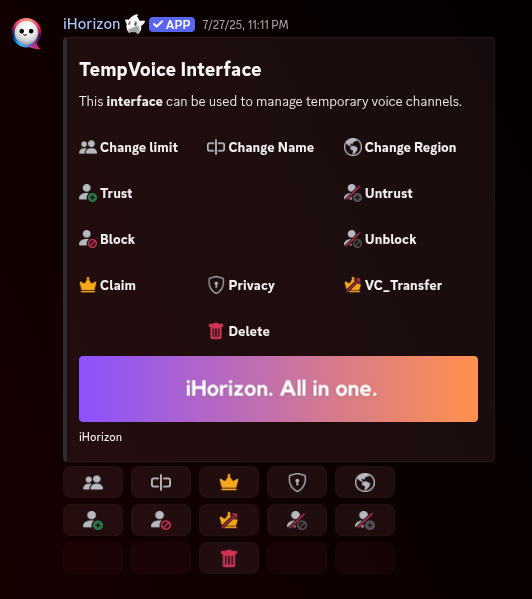
The commands below all live under /voice interface and configure how those temporary channels are created. Start by setting the hub channel with set-voice-channel, then adjust the rest to taste.
/voice interface set-voice-channel <channel>
Requires the Administrator permission
Only members with the Administrator permission can use this command.
| Option | Type | Required | Choices |
|---|---|---|---|
channel |
Channel | Yes | - |
Sets the "join to create" hub. When someone joins this channel, iHorizon immediately creates a personal voice channel for them and moves them into it. This is the one required setting to get the system running.
/voice interface set-text-channel <channel>
Requires the Administrator permission
Only members with the Administrator permission can use this command.
| Option | Type | Required | Choices |
|---|---|---|---|
channel |
Channel | Yes | - |
Sets where the control panel is posted, the interface members use to manage their temporary channel (rename, lock, limit, kick, and so on).
/voice interface set-staff-role
Requires the Administrator permission
Only members with the Administrator permission can use this command.
Sets a staff role that is allowed to manage every temporary channel, not just the ones they own. Give it to your moderators so they can step into any voice channel and take control when needed.
/voice interface set-voice-channel-catgory <category>
Requires the Administrator permission
Only members with the Administrator permission can use this command.
| Option | Type | Required | Choices |
|---|---|---|---|
category |
Channel | Yes | - |
Chooses the category where new temporary channels are created, so they all stay neatly grouped in one part of your server.
/voice interface set-voice-channel-position <position_type>
Requires the Administrator permission
Only members with the Administrator permission can use this command.
| Option | Type | Required | Choices |
|---|---|---|---|
position_type |
String | Yes | Up (TOP), Down (Bottom) |
Decides whether new temporary channels appear at the top or the bottom of their category.
/voice interface set-voice-channel-name <channel_name>
Requires the Administrator permission
Only members with the Administrator permission can use this command.
| Option | Type | Required | Choices |
|---|---|---|---|
channel_name |
String | Yes | - |
Sets the default name given to each newly created channel. Members are free to rename their own channel afterwards from the control panel.
{Username} variable
You can use the {Username} variable in the name; it is replaced with the name of the member the channel is created for. For example, {Username}'s channel becomes Kisakay's channel.